Nitro 5 15 2020 Specs, Features, and Value: Is it worth the price tag?
The Acer Nitro 5 15 (2020) is one of the best-known budget gaming laptops from its era, offering a blend of capable hardware, practical cooling, and an affordable price point. For buyers who anchored their decision around raw value—balancing performance against cost—the Nitro 5 15 (2020) often showed up near the top of consideration lists. This article examines the laptop's specifications, real-world strengths and weaknesses, who it serves best, and how it stacks up against likely alternatives. The goal is to help readers decide whether the Nitro 5 15 (2020) still makes sense for their needs or whether a different purchase direction would be wiser.
Introduction: Who is the Nitro 5 15 (2020) for?
The Nitro 5 15 (2020) targets budget-conscious gamers, students, and creators who want solid 1080p performance without breaking the bank. Typical buyers prioritize value—good CPU/GPU combos, upgradeable RAM and storage, and a full-size keyboard—over premium materials or extreme portability. Common real-world use cases include playing mainstream esports titles (Valorant, CS:GO, Fortnite) at high frame rates, casual AAA gaming at medium settings, video editing on a budget, and multitasking for school or work.
Key specifications overview
Because the Nitro 5 15 (2020) shipped in several configurations, the specific experience depends on the selected CPU, GPU, RAM and storage options. The most common configurations include Intel Core i5/i7 or AMD Ryzen 5/7 processors paired with NVIDIA GTX 1650, GTX 1650 Ti, or GTX 1660 Ti GPUs. Below is a compact breakdown of typical specs to expect from this model year.
| Component | Typical Options |
|---|---|
| Display | 15.6" IPS, 1920×1080 (120Hz or 60Hz options); ~250–300 nits |
| Processor (CPU) | Intel Core i5-9300H / i7-9750H or AMD Ryzen 5 4600H / Ryzen 7 4800H (varies by region) |
| Graphics (GPU) | NVIDIA GeForce GTX 1650 / 1650 Ti / 1660 Ti |
| Memory (RAM) | 8GB / 16GB DDR4 (user-upgradeable; two SO-DIMM slots) |
| Storage | 256GB / 512GB NVMe SSD (M.2) + optional 2.5" SATA bay |
| Battery | ~57–60 Wh (mixed-use battery life: ~4–7 hours depending on load) |
| Weight | Approx. 2.3–2.5 kg (5–5.5 lbs) |
| Ports | HDMI 2.0, Ethernet, USB-A 3.1, USB-C (varies), 3.5mm combo jack, SD card reader (region-dependent) |
| Other | Backlit keyboard (red in many trims), dual-fan cooling, Acer NitroSense utility |
Design and build quality
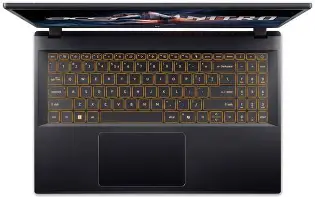
The Nitro 5 15 (2020) leans into a gamer-oriented aesthetic: angular lines, red accents, and a matte plastic shell that resists fingerprints. The chassis uses mostly plastic rather than metal, which keeps costs down and allows easier repairability and upgrades. The hinge is sturdy for everyday use but can feel a touch less premium than metal-clad alternatives. For users who prioritize portability and premium materials, the Nitro 5 is not meant to compete with thin-and-light ultrabooks; instead, it prioritizes durability and serviceability at a budget price.
Real-world impression
Out in everyday use—carrying between home and campus or setting up a gaming station—the Nitro 5 feels solid. The lid doesn’t flex excessively, and the base holds up well under typing and gaming loads. Users who frequently travel should expect a mid-weight device; it is manageable in a backpack but not ideal for all-day mobile use.
Display: clarity vs. color accuracy
The typical 15.6-inch 1080p IPS panel delivers crisp visuals and reasonable viewing angles. High-refresh 120Hz panels on select models significantly improve fluidity in fast-paced titles. Color accuracy and brightness are adequate for gaming and streaming, though not class-leading for professional photo or video color work without external calibration.
Buyers who need accurate color reproduction for content creation should treat the Nitro 5 as a capable budget workhorse but consider an external calibrated monitor for color-critical tasks.
Performance: CPU, GPU, and real-world gaming
Performance is where the Nitro 5 15 (2020) earns most of its reputation. Configurations with six-core Intel H-series CPUs or higher-end Ryzen options combined with GTX 1650/1660-class GPUs offer competent 1080p performance. Typical expectations:
- Esports titles (Valorant, CS:GO, League of Legends): 120+ FPS on high settings with a 120Hz panel.
- Popular AAA games (Shadow of the Tomb Raider, Metro Exodus): 40–70 FPS on medium settings depending on GPU choice.
- Content creation (light video editing, photo editing): Comfortable for 1080p timelines and multitasking with 16GB RAM.
For buyers who prioritize 1440p or high-fidelity 4K gaming, this model’s GPU options are limited; the Nitro 5 is optimized for 1080p performance.
Thermals and noise
The Nitro 5 uses a dual-fan cooling design with heat pipes and exhaust vents. Under heavy sustained loads the fans ramp up and can be audible, a typical behavior for this price and class. Thermal throttling is managed reasonably well—CPU and GPU clocks remain stable for most gaming sessions—but extremely long, heavy workloads (e.g., extended AAA play at max settings or continuous rendering jobs) may see some reductions in peak frequencies. Acer’s NitroSense utility allows manual control of fan profiles to prioritize performance or quieter operation.
Discover deals on Electronics — updated daily.
Shop Amazon →Keyboard, trackpad, and daily usability
The full-size keyboard with a numeric keypad is comfortable for long typing sessions and gaming. Key travel is adequate, and many buyers appreciate the dedicated Nitro-branded gaming look with red backlighting on budget models. The trackpad is serviceable for everyday work; however, gamers will typically prefer an external mouse for precision.
Ports and expandability
One of the Nitro 5’s strong suits is upgradeability. The design commonly exposes two RAM slots and an M.2 slot, plus a 2.5" SATA bay for adding a secondary drive. This means an 8GB base model can be upgraded to 16GB or 32GB affordably later, and storage can be expanded without replacing the factory SSD.
Connectivity options are practical for gamers and students: HDMI for external displays, Ethernet for stable online play, and multiple USB ports for peripherals. The presence of USB-C varies by configuration, so buyers should verify the exact spec for their SKU.
Battery life
Battery life is average. Expect around 4–6 hours of mixed use (web browsing, productivity), and significantly less during gaming—typically 1–2 hours depending on settings. The device is meant to be primarily used plugged in during gaming sessions. For buyers who need long unplugged productivity sessions, a thin-and-light laptop will likely be a better fit.
Software and warranty
The Nitro 5 ships with Windows and the NitroSense utility for performance monitoring and fan control. Some preinstalled apps are present; a light cleanup can improve out-of-box responsiveness. Warranty coverage follows regional norms—usually one year—so buyers who want extended support should consider purchasing an extended warranty or checking retailer/brand promotions at the time of purchase.
Pros & Cons
- Pros
- Strong value for 1080p gaming performance with GTX-class GPUs
- Good upgradeability: dual RAM slots, M.2 + 2.5" SATA bay
- 120Hz display option on some models for smoother gameplay
- Sturdy, practical build that focuses on durability and repairability
- Reasonable port selection including Ethernet for stable multiplayer
- Cons
- Plastic chassis feels less premium than metal alternatives
- Fans can get loud under sustained loads
- Average battery life—primarily meant for plugged-in use
- Display color accuracy is only fair out of the box for professional creators
- Higher-tier GPU/CPU options become less value-driven compared with newer models
Comparison table: Nitro 5 15 (2020) vs. common contemporaries
The table below compares representative configurations rather than exhaustive SKUs. This highlights how the Nitro 5 15 (2020) positioned itself versus similar budget gaming laptops from 2020.
| Model | Typical CPU | Typical GPU | RAM / Storage | Display | Ideal buyer |
|---|---|---|---|---|---|
| Acer Nitro 5 15 (2020) | i5-9300H / Ryzen 5 4600H | GTX 1650 / 1660 Ti | 8GB/256GB base, upgradeable | 15.6" FHD, 60–120Hz | Value-focused gamers and students |
| ASUS TUF Gaming A15 (2020) | Ryzen 5/7 4000 series | GTX 1650 / 1660 Ti | 8–16GB / 512GB | 15.6" FHD, 144Hz options | Gamers wanting higher refresh rates and rugged build |
| Lenovo Legion 5 (2020) | Ryzen 5/7 or Intel H-series | GTX 1660 Ti / RTX 2060 | 8–16GB / 512GB | 15.6" FHD, 60–144Hz | Buyers seeking stronger GPU options and balanced thermals |
Buying guide: What to prioritize when choosing a Nitro 5 15 (2020)
When evaluating a Nitro 5 15 (2020), consider the following factors based on real-world priorities:
1. Use case: gaming, study, or content creation?
If gaming at 1080p is the priority, prioritize a configuration with the best GPU available in the budget (GTX 1660 Ti if possible). For multitasking and content creation, aim for 16GB RAM and, ideally, an 6-core (or higher) CPU. Students who mostly use office apps and light media consumption can save by choosing the i5/8GB base and plan to upgrade RAM later.
2. Display: refresh rate vs. color quality
Competitive gamers benefit from higher refresh rates (120Hz or 144Hz on contemporaries), while creators need better color accuracy. Decide which matters more and choose the panel accordingly—even within the same Nitro 5 line, panel options vary.
Shop the latest Electronics picks on Amazon.
Shop Amazon →3. Upgrade path
One of the Nitro 5’s advantages is expandability. If buying a base model with 8GB RAM, confirm the presence of a second RAM slot and a free 2.5" bay so future upgrades are straightforward. This allows users to spread cost over time while maintaining good performance.
4. Thermals and noise tolerance
Buyers sensitive to fan noise should look for reviews that test fan profiles and throttling. The NitroSense utility helps, but budget designs trade silence for cooler internal temps. If quiet operation is a must, target models with larger heat pipes or compare to alternatives like the Lenovo Legion series.
5. Warranty and serviceability
Check the warranty terms in the buyer’s region and whether the laptop can be opened easily for RAM and storage upgrades. Third-party repairability guides and user videos help assess how invasive an upgrade will be.
6. New vs. used/refurbished
Because the Nitro 5 (2020) is a previous-generation model, used or refurbished units are common. When considering a used unit, inspect the battery health, fan noise under load, and whether the SSD has been upgraded. A refurbished unit from a reputable vendor can offer good value, but a thorough condition check is essential.
Real-world scenarios: who should buy it?
The Nitro 5 15 (2020) makes sense in these scenarios:
- Budget gamers who want playable 1080p performance without paying for premium materials or cutting-edge GPUs.
- Students needing a capable all-around laptop for study, light gaming, and multimedia, with the ability to upgrade later.
- Content creators on a budget doing 1080p video editing or photo work who can accept a less color-critical display and will add more RAM if necessary.
It is less suitable for: buyers who need extended battery life away from power, those who demand the quietest thermals under load, or purchasers seeking the absolute best build quality and thinness.
Conclusion
The Acer Nitro 5 15 (2020) remains a compelling value proposition for buyers who want solid 1080p gaming performance, practical upgrade paths, and a durable, serviceable design without paying a premium. It balances performance, expandability, and affordability in a way that suits students, casual gamers, and budget-minded creators. However, compromises—plastic construction, average battery life, and audible fans under load—are part of the package. For those whose priorities are portability, long battery life, or top-tier thermals, newer or higher-tier alternatives may be more appropriate.
Ultimately, whether the Nitro 5 15 (2020) is worth the price depends on the buyer’s needs: if value and upgradeability are at the top of the list, it often is. If the buyer prioritizes premium materials, quieter operation, or future-proof GPU performance, it may be worth looking at higher-priced or more recent models.