Khadas Mind 2S Mini Pc Specs, Features, and Value: Is it worth the price tag?
Introduction
The Khadas Mind 2S is a compact, modular mini PC that positions itself between ultraportable compute sticks and full-sized desktop towers. Designed for power users, creators, and edge AI enthusiasts, the Mind 2S combines modern Intel Core Ultra processors, integrated AI acceleration, high-speed I/O and a modular ecosystem that allows the core unit to remain pocketable while offering optional docks for desktop-class expansion. This article examines the Mind 2S’s specifications, real-world capabilities, and how it stacks up against other small-form-factor options so potential buyers can decide whether the price reflects the value.
What the Khadas Mind 2S Is (and What It Isn’t)
At its core the Mind 2S is a high-performance mini PC in an ultra-compact chassis. It isn’t a laptop replacement with an integrated keyboard and display, nor is it a traditional desktop with full, user-replaceable components. Instead, it aims to deliver desktop-grade CPU and AI performance in a package that is designed to be expanded via plug-in modules (docks, graphics modules, and display accessories). That modular approach is one of its defining selling points—and one that factors heavily into whether the overall cost is justified.
Key Specifications and Hardware Overview
The Mind 2S is offered in configurations centered around Intel’s Core Ultra family (Arrow Lake / next-gen mobile Ultra variants). While exact SKU availability can vary by region, the common hardware attributes buyers will encounter are:
Processor and Graphics
- CPU: Intel Core Ultra-series mobile processors (examples include Core Ultra 7-level options). These are multi-core, hybrid-architecture chips designed for high single-thread and multi-thread throughput with a power-efficient profile suitable for a compact chassis.
- Integrated GPU: Intel Arc-class integrated graphics capable of everyday GPU tasks, light to moderate content creation and gaming, and acceleration for media encoding/decoding.
- AI Acceleration: On-chip neural processing features are exposed by the platform (NPU/AI engines within the Intel Ultra family), making the unit useful for on-device inference and accelerated ML workloads.
Memory and Storage
- RAM: LPDDR5X soldered memory up to 64 GB on higher SKUs. Memory is not user-upgradeable in the typical Mind 2S configuration because it is soldered to the board.
- Storage: M.2 NVMe slot (commonly 2230 size) supporting PCIe Gen4 x4 NVMe SSDs. Typical configurations ship with 512 GB to 2 TB NVMe SSDs; the magnetic cover or tool-free hatch often streamlines SSD access for upgrades.
Connectivity & I/O
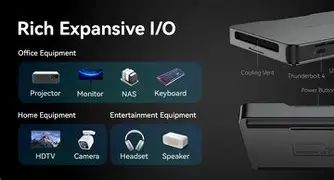
- High-speed ports: Thunderbolt 4 / USB4-capable ports on selected configurations (40 Gbps), plus multiple USB-A 3.2 Gen2 ports for peripherals.
- Video outputs: HDMI 2.1 and display over Thunderbolt/USB4; multi-monitor capabilities are supported with high-resolution/refresh modes.
- Networking: Wi‑Fi 6E and Bluetooth 5.x are standard on recent SKUs. Some versions rely on docks for a full-sized Ethernet port.
- Optional expansion: Proprietary expansion interface(s) for graphics docks (e.g., a Mind Graphics eGPU dock), docking modules (additional ports, Ethernet, audio), and portable display adapters.
Power, Design, and Thermal
- Power delivery: USB-C power delivery adapters in compact wattages (typical chargers in the 65 W range for the core unit); docking or eGPU modules may require their own PSU.
- Form factor: Lightweight aluminum chassis, pocketable dimensions (small footprint and shallow thickness) intended for portability and quiet operation.
- Thermals: A mixed approach is used: the core unit is optimized for passive or low-noise cooling at moderate sustained loads, while heavy sustained loads are expected to be offloaded to an eGPU or cooled dock in desktop scenarios.
Software and OS Support
- Operating systems: Typically shipped with Windows 11 and vetted for Linux support (Ubuntu and other popular distributions). Community and vendor drivers are available for enabling AI and GPU acceleration features on supported kernels.
- Drivers & tools: Khadas provides firmware updates and utilities for firmware, docking modules, and power management; third-party drivers may be required for some experimental features or docks.
Detailed Product Analysis: Real-world Performance and Use Cases
Evaluating the Mind 2S requires separating two operating modes: portable (the standalone core) and docked/expanded (using the optional Mind Dock and Mind Graphics modules). Both have different strengths and trade-offs.
Portable mode: productivity on the go
As a pocketable desktop the Mind 2S excels at typical productivity—web browsing, office suites, video conferencing and light photo editing. The integrated Arc GPU plus the efficient Ultra CPU deliver snappy responsiveness for single-threaded apps and web-heavy workflows. For developers, the device can comfortably handle local compiles for small- to medium-sized projects and provides good battery-backed resume and low-latency sleep states for mobile work.
Creator and light content-production workflows
For photo editing and 1080p/4K video editing workloads, the Mind 2S is capable if configured with adequate RAM and a fast NVMe SSD. Transcoding, color grading, and timeline scrubbing are workable for shorter projects. The integrated NPU and GPU accelerate media codecs and some creative tools that expose hardware acceleration, reducing export times compared with older integrated-only devices.
AI at the edge and local inference
One of the Mind 2S’s competitive advantages is on-device AI inference. The platform’s NPU and the CPU/GPU combination make it suitable for model prototyping, inferencing for small vision models, local speech recognition, and smart camera or embedded analytics. For users working on ML model optimization, it means reduced cloud costs and privacy advantages for sensitive inference tasks.
Gaming and external GPU scenarios
Light gaming runs well on integrated Arc GPU at modest settings and resolutions. For higher frame rates or demanding AAA titles, the modular eGPU option allows the Mind 2S to pair with a desktop-class Nvidia GPU in the Mind Graphics dock—effectively turning the tiny unit into a full desktop replacement when docked at a desk. That flexibility, however, comes at added cost, power consumption and weight when the GPU dock is included.
Looking for the best Laptops & Computers deals on Amazon?
Browse Now →Power users and home labs
System administrators and enthusiasts will appreciate the Mind 2S for compact home-lab roles: containerized workloads, small virtualized services, and network appliances. Wi‑Fi 6E and high-speed USB make it a capable endpoint, while the magnetically accessible SSD slot simplifies storage changes for different testing images.
What Buyers Typically Care About
Potential customers evaluate the Mind 2S along predictable axes:
- Raw and sustained performance: Is the unit fast enough for the intended workloads without thermal throttling?
- Upgradability: Can RAM or storage be expanded later? (Storage usually is; RAM typically is not.)
- Ports and connectivity: Are there enough high-speed ports and is wired Ethernet available or must a dock be purchased?
- Noise and heat: Is the fan noise acceptable during heavier workloads, and does the unit manage thermals well?
- OS and Linux support: Do drivers exist for Linux users, and are firmware updates frequent?
- Total cost of ownership: How much do required accessories (docks, eGPU) add to the headline price?
Pros & Cons
- Pros:
- Extremely compact, premium build quality and pocketable chassis
- Powerful Intel Core Ultra-series performance for a mini-form-factor
- Integrated AI acceleration suitable for edge inference and ML prototyping
- High-speed I/O including Thunderbolt 4 / USB4 and HDMI 2.1
- Modular ecosystem enables eGPU and expanded I/O when needed
- Fast NVMe storage and high-capacity RAM options on higher SKUs
- Cons:
- RAM is soldered and not user-expandable on most configurations
- Essential docked features (Ethernet, audio, additional ports) may require buying extra modules
- Total cost can rise quickly once docks and external GPU are added
- Thermals can limit sustained performance in the compact, standalone configuration
- Some Linux driver integration requires effort for niche features
How the Mind 2S Compares (at a glance)
The table below provides a high-level comparison between the Khadas Mind 2S and two representative alternatives in the compact desktop space: an Intel NUC-class mini PC and a mainstream Apple Mac mini. This is a general comparison to help buyers understand fit and trade-offs.
| Model | Typical CPU | Max RAM | Storage | GPU | Ports & Expandability | Target user | Typical price range (USD) |
|---|---|---|---|---|---|---|---|
| Khadas Mind 2S | Intel Core Ultra (mobile Ultra 5/7) | Up to 64 GB (soldered) | M.2 NVMe (2230) PCIe Gen4 | Intel Arc integrated; optional eGPU via dock | Thunderbolt 4/USB4, HDMI 2.1, modular docks for Ethernet/audio/GPU | Power users, creators, edge AI devs who value modularity | $799–$1,399 (core); more with docks/eGPU |
| Intel NUC-class mini PC | Intel Core mobile or desktop S-series (varies) | Often user-upgradeable, 16–64 GB | M.2 NVMe, some models include 2.5" bay | Integrated Intel or discrete options | Multiple USB, HDMI/DisplayPort, often RJ45 onboard; some models support internal expansion | General-purpose desktop users, small offices, media centers | $500–$1,200 depending on config |
| Apple Mac mini (M2 family) | Apple M2 / M2 Pro | Unified memory; 16–32 GB (varies by SKU) | Internal SSDs, user-upgrade limited (config at purchase) | Apple integrated GPU (very capable for media/apps) | Thunderbolt/USB4, HDMI, sometimes Ethernet onboard | Creators and users in Apple ecosystem who need compact macOS desktop | $599–$1,599 depending on SKU |
Buying Guide: How to Decide If the Mind 2S Is Right
Prospective buyers should align purchase choices with use cases and budget. The sections below outline practical checkpoints.
1. Define the primary workload
If the main tasks are web, office work, and occasional photo editing, a less expensive mini PC may suffice. If the workflow includes AI model inference, video editing, software development with local containers, or the desire for an easily-dockable portable desktop, the Mind 2S is a stronger match.
2. Understand the total cost (core unit + accessories)
The Mind 2S core unit is only one part of the ecosystem. If wired Ethernet, 3.5mm audio, extra USB ports or desktop-class GPU performance are required, factor in the Mind Dock or Mind Graphics module. These accessories can significantly increase the final price—budget accordingly.
3. Memory and storage choices
Choose the largest RAM configuration that fits the intended workload upfront because RAM is typically soldered. Opt for a fast NVMe SSD for responsiveness; users who need large project files should confirm whether secondary storage is possible or plan for networked storage.
Find top-rated Laptops & Computers products at great prices.
View Offers →4. OS and driver considerations
Windows 11 is the mainstream supported OS and guarantees broad driver availability. Linux is generally supported but may require additional setup for hardware acceleration and proprietary docks—buyers seeking smooth Linux experience should check community documentation and vendor notes for the specific SKU.
5. Portability vs. expandability trade-off
If portability matters most, the Mind 2S standalone is compelling—compact and quiet. If the primary usage is stationary and requires the highest performance, buying the eGPU dock and a larger GPU changes the dynamics; in that case compare the total cost to a similarly equipped small desktop or a small tower.
6. Warranty and support
Confirm warranty length and the vendor’s RMA process. Modular accessories may have separate support terms. For business deployments, enterprise support and volume purchase options should be evaluated.
Practical Tips Before Purchase
- Buy the highest RAM configuration affordable if planning to run VMs, containers or heavy creative apps.
- Factor in any additional module cost—especially if wired Ethernet or a desktop GPU will be used regularly.
- Check the specific SKU’s port list; some variants place particular ports on the dock rather than the core unit.
- For Linux workflows, consult community forums for the exact model to see how well the kernel and drivers support the Ultra-series features out of the box.
- For long-running heavy compute, plan to use the eGPU or a cooling-capable dock to avoid thermal limits in the compact chassis.
Conclusion
The Khadas Mind 2S is a modern, thoughtfully engineered mini PC that targets users who want a blend of portability, high single- and multi-thread performance, and an expandable modular ecosystem. It shines for creative pros who value on-device AI acceleration, for developers needing a small development workstation, and for edge AI experimentation. The primary trade-offs are soldered memory, incremental cost for essential docks, and thermal limits when running sustained heavy loads on the tiny core unit.
Whether it is worth the price depends on the buyer’s priorities. For those who prize modularity—owning a small, portable compute block that can grow into a desktop with an eGPU and expanded I/O—the Mind 2S represents strong value and unique flexibility. For users who prioritize the lowest possible total cost or want maximum user-serviceability (replaceable RAM, 2.5" drives), a more conventional NUC-style mini PC or a small tower could be a better fit.
In short: the Mind 2S rewards buyers who understand the ecosystem model and plan configurations around their actual needs. When chosen and stocked appropriately for the intended workload, it is a compelling, forward-looking option in the compact PC market.